Eqiva eQ-3 thermostatic radiator valve ~
Overview~
This feature is included in tasmota32-bluetooth.bin
When compiling your build, choose the tasmota32-bluetooth build variant or add the following to user_config_override.h:
#define USE_BLE_ESP32
#define USE_EQ3_ESP32
This driver enables the control of Eqiva thermostatic radiator valves (TRVs).
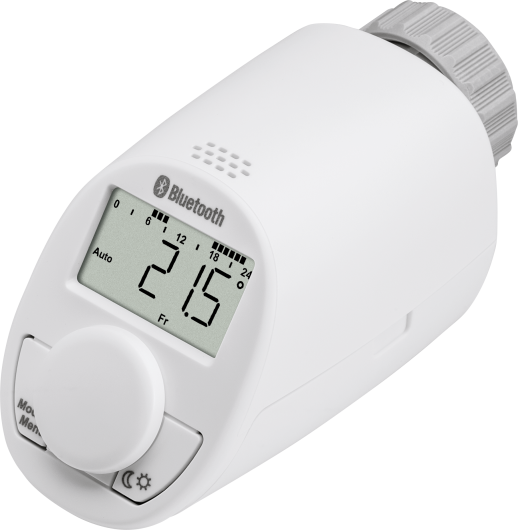
These models are compatible:
- Eqiva eQ-3 Bluetooth Smart (141771E0/141771E0A)
- Eqiva eQ-3 Bluetooth Smart UK version (142461D0)
Other Eqiva eQ-3 models should work as well. Ensure you select a Bluetooth model, as non-Bluetooth versions are available.
For advanced device settings, hardware configuration, or troubleshooting, the official user manuals can be highly helpful: DE/EN | FR/NL | PL/IT.
Custom firmware~
There is a custom firmware available for the eQ-3 thermostat. Please visit the GitHub firmware repo of David Buezas. Here you will find all news and information about installing and configuring the powerful firmware.
Using this custom firmware provides significant advantages and introduces new features to Tasmota:
- Passive Telemetry: The firmware periodically broadcasts its state via BTHome v2 beacons. Tasmota can read these advertisements directly from the air to update device states instantly. When the beacons are encrypted, it is indicated by the 🔑 symbol. In that case, use the
MI32Keyscommand to tell Tasmota the decryption key, that you have configured in the custom firmware web app. - Enhanced Data Fields: Through these broadcasts, Tasmota can now capture and display the ambient room temperature and the precise battery level as a percentage, alongside valve position and operation modes.
- Better Battery Life: Since Tasmota processes the passive broadcasts, the need for continuous, energy-draining connection-based polling cycles is drastically reduced.
- Pairing Options: The custom firmware offers pair-less connection options and a settable pairing PIN. Removing the requirement for a PIN makes the initial connection of the TRV to Tasmota very easy. For enhanced security, the pairing PIN can be enabled and paired later on.
Operation modes~
The eQ-3 TRV has 3 modes of operation:
| Mode | Description |
|---|---|
| 🕗 auto | Follows the week program. A temperature different from the week program can be set at any time, but at the next programmed timeslot the valve will switch back to the preset temperature. |
| ✋ manual | Keeps the current requested temperature. |
| 🌴 holiday | Keeps the temperature set for the holiday duration and then automatically switches back to auto mode and running the week program. |
These 3 modes can be set and configured using different commands described below.
Setup~
Before you can use the TRV, you will need to enable Bluetooth on the valve:
- Press the Mode/Menu button for at least 3 seconds.
- Select the menu item
bLEwith the control wheel and confirm by pressing the control wheel shortly. - The display will show
OFFto deactivate the function orOnto activate the function. - Confirm by pressing the control wheel shortly.
Pairing Process
Depending on the firmware version of your TRV, physical pairing may be required:
- No pairing needed: On older versions, it is sufficient to just turn Bluetooth on (
bLEtoOn). - Manual pairing required: If the device does not connect automatically, you must pair it manually via the Tasmota console.
- Custom Firmware: The pairing behavior of the custom firmware depends on its settings. Initially, it is a good idea to configure the TRV to not ask for a PIN.
Important: Place the ESP32 and the TRV within a few centimeters of each other during setup. Pairing will fail if the distance is too large due to low signal strength during the initial key exchange.
- Press and hold the control wheel on the TRV until
PAIris briefly displayed. It is best to stop background polling during pairing (e.g.,TRVPeriod 0andMI32Period 0). - The TRV will then temporarily display a 6-digit PIN code in two sequential parts (e.g.,
123-followed by-456). - Combine these parts into a single 6-digit PIN (e.g.,
123456). - Open the Tasmota Web Console and execute the
BLEPaircommand using the TRV's MAC address and the PIN:
BLEPair <MAC or BLEAlias> <PIN>
Tip: If you see a FAILNOSERVICE message in the Tasmota log, this is a primary indicator that pairing is required. Monitor the log and repeat the BLEPair command a few times if necessary, until the log explicitly confirms that it has successfully paired.
Note: Make sure the Eqiva smartphone app is closed, as the TRV only connects to one device at a time.
Next you will need to make sure that BLE is enabled in Tasmota:
- Configuration
- Configure BLE
- Enable Bluetooth
If the TRV is not already displayed on the Tasmota main menu, you can follow these steps to determine the MAC address of the TRV:
- Go to the BLE menu in Tasmota
- Enable active scan
- Type in the Tasmota console:
TRVDevList
This will give you the MAC address of each valve.
Tip
- Enable only one valve at a time as this makes it easier to identify
- You might need to wait a minute or so or repeat the
TRVDevListcommand a few times before the devices have been properly identified - Keep in mind that the original TRV does NOT report the current temperature, only the requested target temperature. However, if the TRV runs the custom firmware, the ambient room temperature will be displayed. Alternatively, the Xiaomi Thermometer LYWSD03MMC makes a perfect combo for measuring the room temperature
After configuring, Tasmota will poll the discovered valves and publish their state under stat/EQ3/<MAC Address>. If you have configured an alias for the MAC address of the valve, the topic changes to stat/EQ3/<BLEAlias>. To configure an alias use the command BLEAlias.
The interval between polls can be configured by using the command TRVPeriod. Tasmota needs to have an NTP or RTC time configured for this to work.
Operating your TRV~
There are two ways to control your TRV:
- The Tasmota Console (convenient for setup)
Syntax:TRV <MAC> <subcommand> [options]
Example:TRV 001A2216A458 settemp 21.5 - MQTT
Syntax:cmnd/<tasmota_topic>/EQ3/<MAC>/<subcommand> [options]
Example:cmnd/ble_esp32/EQ3/001A2216A458/settemp 22.5
As shown in the example above, the MQTT command topic and payload are composed of the following elements:
- Standard Tasmota
%prefix%(e.g.,cmndfor sending commands) %topic%of the Tasmota BLE gateway (e.g.,ble_esp32in this example)- An
EQ3element to specify that the command is for the EQ3 driver - The MAC address or alias of the TRV
- The subcommand sent to the TRV
- Optional parameters or values required by the subcommand (passed as the MQTT payload)
The available subcommands are described in the TRV subcommands section.
Available commands~
Base commands~
| Command | Description and parameters |
|---|---|
| TRVPeriod | <seconds> = EQ3 poll interval in seconds.During this interval, a poll (state) command is automatically sent to every TRV.0 = disables automatic polling.1 = immediately starts a poll cycle, but does not change its value.At boot time, this value is set to TelePeriod. |
| TRVRetries | <retries> = maximum number of command transmission retries to the TRV (0..10).At boot time, this value is set to 4 |
| TRVMinRSSI | <rssi> = minimum RSSI signal strength threshold for discovering TRV devices (-99..0).At boot time, this value is set to -99 |
| TRVOnlyAliased | <value> = EQ3 OnlyAliased parameter.0 = all devices will be processed (default).1 = only devices with an alias will be processed.2 = only devices whose alias starts with EQ3 will be processed. |
| TRVHideFailedPoll | <value> = hide failed periodic polling responses.0 = send MQTT response even if polling fails.1 = hide/suppress MQTT response when a periodic polling fails (default). |
| TRVDevList TRVScan | Display all discovered TRVs. |
| TRVReset | Remove all known devices and clear the command queue. |
TRV subcommands~
Commands must follow the syntax TRV <MAC> <subcommand> [options] as explained in the Operating your TRV section.
| Subcommand | Description and parameters |
|---|---|
| state | Request the current valve state without changing any settings, except for synchronizing the time on the valve. Note: If your ESP32 Tasmota is not synchronized with a valid date and time, this command will set the wrong time and date on the TRV. See settime. |
| settemp | <temperature> = set the desired target temperature |
| valve | <value> = control the valve stateoff = enable frost protectionon = open the valve completelyNote: If set to auto or holiday, the valve switches back to the target temperature at the next timeslot. To set the valve permanently, please use the commands on or off. |
| on | Set mode to manual and open the valve completely. This can potentially extend battery life during the summer when the central heating is inactive. Note: Temperature will be set to and reported as 30 °C. |
| off | Set mode to manual and enable frost protection. Note: Temperature will be set to and reported as 4.5 °C. |
| mode | <value> = define the current operating modeauto = same as auto, see belowmanual = same as manual, see belowon = same as on, see aboveoff = same as off, see aboveheat = same as on, see abovecool = same as off, see aboveNote: The third mode holiday can only be set with the setholiday command. |
| auto | Set operating mode to auto. Run the week program as stored in the TRV. Note: Setting a custom temperature or switching to day/night mode will be overridden at the next programmed timeslot. |
| manual | Define manual as the current operating mode. Disable the week program and keep the temperature as selected with settemp / day / night. |
| day | Switch to the configured comfort temperature. |
| night | Switch to the configured reduction temperature. |
| setdaynight | <daytemp> <nighttemp> = set the comfort and reduction temperature |
| boost 🔥 | [<value>] = activate boost mode (valve opens 80% for 5 minutes). This is the default when no parameter is given.0 / off = deactivate boost mode (same as unboost)Note: Boost mode stops automatically after 5 minutes. |
| unboost | Deactivate boost mode. |
| lock 🔒 | [<value>] = disable TRV buttons (child lock). This is the default when no parameter is given.0 / off = enable TRV buttons (same as unlock) |
| unlock | Enable TRV buttons. |
| window 🪟 | <value> = set window state of the TRV0 = set window state to closed1 = set window state to openAttention: When you set the window state to open on a TRV with stock firmware, the TRV will never leave that state until you set it to closed via window 0. When your TRV is running the custom firmware, the normal window open countdown is started. |
| settime | [<time>] = synchronize the current Tasmota time to the TRV if no parameter is given.To send a custom time, provide it in the yyMMddhhmmss format (byte-by-byte decimal to hexadecimal conversion ) or use the Hex Generator.Note: If your ESP32 Tasmota is not synchronized with a valid date and time, running this command without parameters will set an incorrect time and date on the TRV. |
| setprofile | <day> <temperature>-<timeslot>,<temperature>-<timeslot>,... = set the temperature schedule for the given day0 = Saturday, 1 = Sunday, ... 6 = FridayIt is also possible to group days: 7 = weekend, 8 = workday, 9 = everyday.Up to seven pairs can be provided. Each temperature is maintained until the associated time. Syntax: <day> <temperature>-<timeslot>,<temperature>-<timeslot> (e.g., 8 21.0-07:30,18.0-22:00,16.0-24:00)Note: The last timeslot must always end at 24:00, otherwise a default temperature is applied to the remaining time. |
| reqprofile | <day> = read the temperature schedule for the given day0 = Saturday, 1 = Sunday, ... 6 = Friday |
| setholiday | <end-date>,<end-time> <temperature> = set the operating mode to holidayThe format for date and time must be YY-MM-DD,hh:mm (e.g., 26-12-24,18:00).The holiday mode will automatically terminate and resume auto mode once the end date and time are reached. Note: Time is set in 30-minute steps. During the holiday period, the TRV ignores week programs. To end holiday mode manually, call auto or manual. |
| setwindowtempdur | <temperature> <duration> = set the window open detection temperature and duration in minutesSyntax: <temperature> <duration> (e.g., 12.0 15) |
| offset | <temperature> = set the temperature offset for calibration (e.g., -1.5 or 2.0) |
Results~
After submitting a command, you will see one or more of the following results:
| Status | Description |
|---|---|
| queued | Command has been accepted by the BLE driver. |
| DONENOTIFIED | Command has been successfully processed by the TRV, and the results are sent in JSON format. |
| ignoredbusy | Only a single command can be accepted in the queue at a time. During the processing of a TRV command, subsequent commands will be rejected. Please resubmit. |
| FAILCONNECT | Connection to the TRV failed after the configured number of automatic retries (see TRVRetries). Please resubmit. |
Reported values~
The TRV reports all values in a JSON-formatted response. Which fields are included depends on the situation, so not all fields are sent every time.
However, there is always a basic set of fields available:
{
  "MAC": "001A2216A458",
  "tas": "ble-esp32-0936",
  "RSSI": -79,
  "stattime": 1786795200,
  "temp": 21.0,
  "posn": 95,
  "mode": "auto",
  "hassmode": "auto",
  "boost": "inactive",
  "window": "closed",
  "state": "unlocked",
  "battery": "GOOD"
}
After executing a command, the following fields are prefixed:
{
  "cmd": "settemp",
  "result": "ok"
}
{
  "dst": "set",
  "holidayend": "00-00-00 00:00",
  "windowtemp": 12.0,
  "windowdur": 15,
  "day": 21.0,
  "night": 17.0,
  "offset": 0.0
}
If the mode is set to holiday, the "holidayend" field indicates the exact expiration date and time:
{
  "mode": "holiday",
  "holidayend": "28-01-02 10:00"
}
In the response for the setprofile command, the profiledayset field indicates which day or group of days was updated:
{
  "cmd": "setprofile",
  "profiledayset": 4
}
In the response for the reqprofile command, the returned JSON object includes the corresponding day-specific profile field, formatted as profileday<n> (where n ranges from 0 to 6):
{
  "cmd": "reqprofile",
  "profileday4": "17.0-07:00,23.0-10:00,17.0-17:00,21.0-23:00,17.0-24:00"
}
If the TRV runs the custom firmware, these fields are additionally included:
{
    "BattLevel": 91,
    "BattVolt":2.731,
    "Ambient": 20.6
}
JSON Response Fields~
| Field | Description |
|---|---|
| cmd | Recent command the response is given for. |
| MAC | MAC address of the TRV. It always returns the actual MAC address, even if an alias was used in the command. |
| tas | Hostname of your Tasmota device. |
| RSSI | BLE signal strength. |
| stattime | Timestamp in seconds since Unix Epoch (January 1st, 1970). |
| temp | Target temperature. |
| posn | Valve position (0 = closed, 100 = fully opened). |
| mode | Operating mode (manual, auto or holiday). |
| hassmode | Mode mapped for Home Assistant usage: auto (= mode auto), off (frost protection enabled), heat (valve is open/heating), or idle (valve is closed/target temperature reached). |
| boost | Boost mode status (active or inactive). Valve opens 80% for 5 minutes. |
| dst | Daylight savings time status (set or unset). |
| window | Status of the window open detection (triggered by a sudden temperature drop): open or closed. |
| state | Child lock status (disables the physical buttons on the TRV): locked or unlocked. |
| battery | Battery status of the TRV (GOOD or LOW). |
| BattLevel | Battery level of the TRV in percent. |
| BattVolt | Battery voltage of the TRV in Volt. |
| Ambient | Ambient room temperature reported by the TRV. |
| holidayend | End date and time of holiday mode. |
| windowtemp | Configured temperature for the window open detection. |
| windowdur | Configured duration (in minutes) for the window open detection. |
| day | Configured comfort temperature. |
| night | Configured reduction temperature. |
| offset | Configured temperature offset for calibration. |
| profiledayset | The day or group of days the profile was set for (0 ... 9). Only included after running the setprofile command. |
| profileday | The temperature profile for the requested day, where <n> ranges from 0 to 6. Only included after running the reqprofile command. |
Control Examples~
Request the current status without changing any settings:
cmnd/ble_esp32/EQ3/001A2216A458/state
Set the target temperature to 21.5 °C:
cmnd/ble_esp32/EQ3/001A2216A458/settemp 21.5
Select the auto operating mode to run the weekly schedule stored in the TRV:
cmnd/ble_esp32/EQ3/001A2216A458/auto
Select the manual operating mode to disable the weekly schedule and maintain the currently selected temperature:
cmnd/ble_esp32/EQ3/001A2216A458/manual
Select the holiday operating mode to suspend the weekly schedule or manual temperatures until January 2nd, 2028 at 10:00, and set the temperature to 18.5 °C:
cmnd/ble_esp32/EQ3/001A2216A458/setholiday 28-01-02,10:00 18.5
Switch the target temperature to the configured comfort level:
cmnd/ble_esp32/EQ3/001A2216A458/day
Switch the target temperature to the configured reduction level:
cmnd/ble_esp32/EQ3/001A2216A458/night
Info
Setting a custom temperature or switching to day/night mode will be overridden at the next programmed timeslot.
Disable the TRV and enable frost protection until the next programmed timeslot:
cmnd/ble_esp32/EQ3/001A2216A458/valve off
Permanently disable the TRV and enable frost protection:
cmnd/ble_esp32/EQ3/001A2216A458/off
Disable the TRV and open the valve completely (potentially extending battery life during summer when the central heating is inactive) until the next programmed timeslot:
cmnd/ble_esp32/EQ3/001A2216A458/valve on
Permanently disable the TRV and open the valve completely:
cmnd/ble_esp32/EQ3/001A2216A458/on
Change the configured comfort and reduction temperatures to 22.0 °C and 17.5 °C:
cmnd/ble_esp32/EQ3/001A2216A458/setdaynight 22 17.5
Activate boost mode (valve opens 80% for 5 minutes):
cmnd/ble_esp32/EQ3/001A2216A458/boost
Disable the TRV buttons (enable child lock):
cmnd/ble_esp32/EQ3/001A2216A458/lock
Synchronize the current Tasmota time to the TRV:
cmnd/ble_esp32/EQ3/001A2216A458/settime
Set a custom time and date manually (byte-by-byte decimal to hexadecimal conversion):
- Date and time: August 15th, 2026 at 14:30:00
- Decimal representation:
26 - 08 - 15 - 14:30:00 - Hexadecimal conversion:
1A - 08 - 0F - 0E:1E:00(YYMMDDHHMMSSin hex) - Concatenated payload:
1A080F0E1E00
cmnd/ble_esp32/EQ3/001A2216A458/settime 1A080F0E1E00
Alternatively, use this interactive generator to create the command payload for any custom date and time:
Tasmota settime Hex Generator
TRV <MAC> settime ... Set the temperature schedule for Tuesday (day 3):
- 20.5 °C until 07:30
- 17.0 °C until 17:00
- 22.5 °C until 22:00
- 18.0 °C until 24:00
cmnd/ble_esp32/EQ3/001A2216A458/setprofile 3 20.5-07:30,17.0-17:00,22.5-22:00,18.0-24:00