HC-SR04 ultrasonic ranging sensor~
This feature is included only in tasmota-sensors binary
When compiling your build add the following to user_config_override.h:
#ifndef USE_SR04
#define USE_SR04                            // Add support for HC-SR04 ultrasonic devices (+1k code)
    #define SR04_MAX_SENSOR_DISTANCE  500   // Set sensor max detection distance    #endif
HC-SR04 (HC-SR04P and JSN-SR04T) is an ultrasonic ranging sensor. Provides 2cm to 300cm of non-contact measurement functionality with a ranging accuracy that can reach up to 3mm. Each HC-SR04 module includes an ultrasonic transmitter, a receiver and a control circuit. See HC-SR04 Ultrasonic Sensor for more information.
Buy example: - AliExpress - Sparkfun
The US-100 can also be use as a HC-SR04 if you remove the jumper at the back (check Adafruit documentation).
Configuration~
Wiring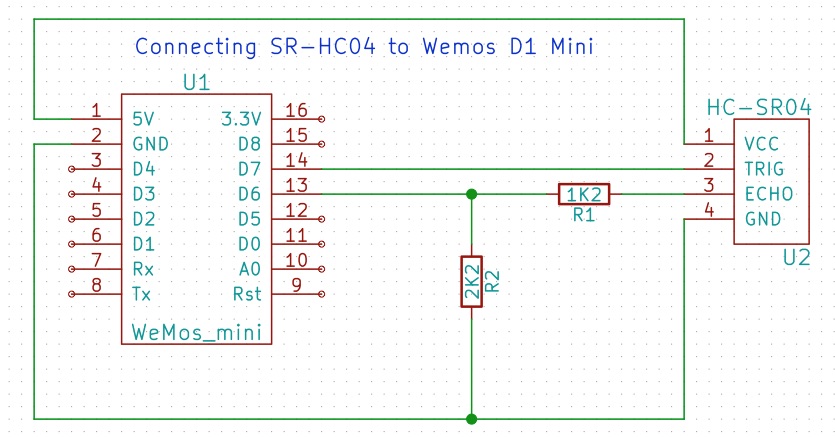 ~
~
| HC-SR04 | ESP |
|---|---|
| Vcc | 5V |
| GND | GND |
| Trig | GPIOx |
| Echo use voltage divider! | GPIOy |
The HC-SR04 operates at 5V and therefore the echo signal will be 5V as well. Connecting the echo pin via a voltage divider (see schematic) will divide the 5V to 3.3V, which is the operating voltage of an ESP8266.
There is a variant of the HC-SR04, called HC-SR04P. It mainly operates at 3.3V and then it doesn't need the voltage divider but you will notice a range drop of about 1 meter. 
Tasmota Settings~
In the Configuration -> Configure Module page assign:
- GPIOx to
SR04 Tri (69) - GPIOy to
SR04 Ech (70)

Tasmota Main~
After a reboot webUI displays the HC-SR04 distance.

Sensor sends a tele/%topic%/SENSOR JSON response:
{"Time":"2019-01-01T22:42:35","SR04":{"Distance":16.754}}
ESP32 Example with MQTT~
The HC-SR04 can be used with ESP32 devices running Tasmota.
Example Wiring~
| HC-SR04 | ESP32 |
|---|---|
| Vcc | 5V |
| GND | GND |
| Trig | GPIO5 |
| Echo | GPIO18 through voltage divider |
Warning
Standard HC-SR04 modules output a 5V Echo signal. ESP32 GPIO pins are 3.3V only, so the Echo pin must be connected through a voltage divider or level shifter.
Tasmota Configuration~
Assign:
- GPIO5 →
SR04 Tri - GPIO18 →
SR04 Ech
Then save and restart the device.
MQTT Telemetry~
Distance measurements are published to:
tele/%topic%/SENSOR
Example payload:
{"Time":"2026-06-16T12:00:00","SR04":{"Distance":42.6}}
Troubleshooting~
| Problem | Possible Fix |
|---|---|
| No distance value shown | Check Trig and Echo GPIO assignments |
| Unstable readings | Use a stable 5V supply and shorter wires |
| ESP32 behaves unexpectedly | Ensure Echo voltage is reduced to 3.3V |
| MQTT data not received | Verify MQTT settings and TelePeriod |